How to make a new folder accessible only for administrators?
Step 1: Open CitizenOne in your browser and log in.
Step 2: In the upper-left corner of the dashboard look for the "Documents" section and click on it.
Step 3: Click "New" button and select create new folder.
Step 4: Enter the folder name, then tick the checkbox "For administrator only", and click "Save" to create the folder.
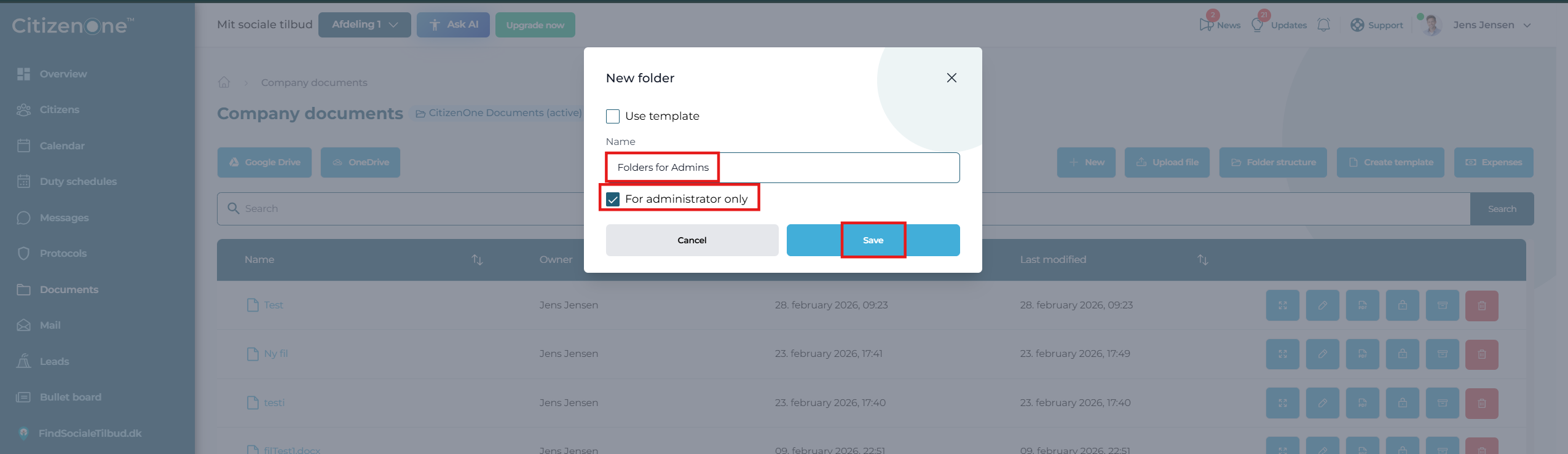
Step 5: The new folder has been created and only administrators have access to it.
Related Articles
How to create new citizen in CitizenOne
Step 1: Open CitizenOne in your browser and log in. Step 2: In the upper-left corner of the dashboard look for the "Citizen" section and click on it. Step 3: Click New citizen. Step 4: Fill out the Citizen details, Inquiry data, and Stay data. Step ...How to edit a form and add more questions in CitizenOne
Step 1: Open CitizenOne in your browser and log in. Step 2: Click on your profile icon in the top right corner. Step 3: Click on Forms in the drop-down menu. Step 4: Select the existing form you want to edit. Step 5: In this form, there is only one ...How to create and manage a form in CitizenOne
Step 1: Open CitizenOne in your browser and log in. Step 2: Click on your profile icon in the top right corner. Step 3: Click on Forms in the drop-down menu. Step 4: Click New Form. Step 5: Enter the form title, form description, and document title. ...